


In this article8 sections
Key takeaways
- A multi-language Shopify store is one store with markets, each language on its own URLs, and payments, prices and delivery promises set per country.
- Use subfolders such as /de and /en: Shopify recommends them for most stores and generates hreflang tags and sitemaps for them automatically.
- Machine translation is a first draft: URL handles and legal policies need translating by hand, tags can’t be translated at all, and every language needs a native speaker’s review.
- Local payment methods follow the shopper’s address and currency, so test checkout with Dutch, Belgian and German addresses before launch.
To build a multi-language Shopify store for Europe, decide your markets first, give every language its own URLs, translate everything a shopper reads rather than just product pages, and set payment methods, prices and delivery promises per country. Shopify Markets and Translate & Adapt handle the plumbing. The details that make people buy are yours to plan.
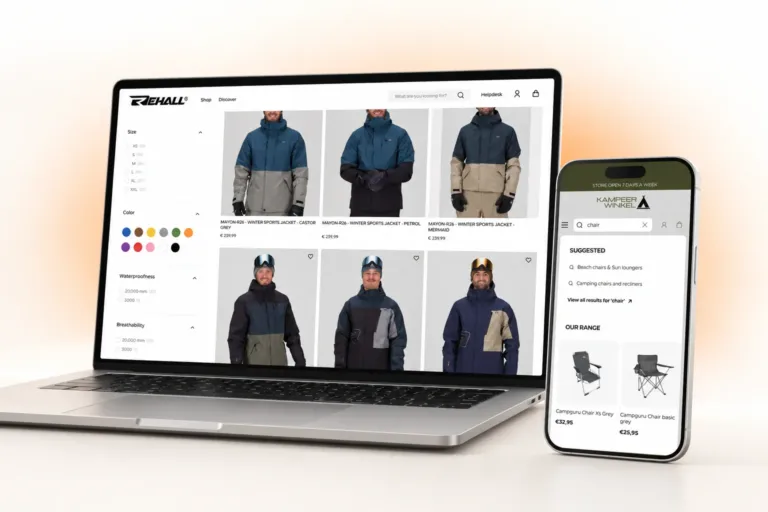
Kampeerwinkel Roermond, a camping store a few kilometres from the German border, sells in Dutch, English and German from one Shopify store we designed and built. This guide is for Dutch, Belgian and German brands planning the same move, and for UK brands selling into the EU. Every Shopify detail was checked in October 2026.
Languages, markets or separate stores? Decide the structure first
How languages and markets fit together in Shopify
In Shopify, a market is an audience, usually a country or a group of countries. Markets let you “tailor their experience with customizations, including currency, language, pricing, and theme content”. Languages are set per domain: you assign each language to a domain, and a market offers the languages of the domain or subfolder it uses.
Language is not country. Belgium shops in Dutch and French, and an English storefront serves expats in Amsterdam as well as UK buyers. So map a grid before anyone opens the admin: each country with its languages, currency, payment methods and delivery promise. Shopify’s requirements for selling in multiple languages allow up to 20 languages, or 30 on Shopify Plus (October 2026).
When separate stores make sense
For most brands entering the Netherlands, Belgium and Germany, one store with several markets is the right call. Shopify’s international sales tools page notes that businesses “with globally dispersed teams that independently manage operations in their local market” might prefer several stores.
| One store with Markets | A store per country | |
|---|---|---|
| Catalogue | One catalogue; product availability can differ per market | A catalogue to maintain in every store |
| Languages and URLs | Subfolders, subdomains or country domains, with hreflang generated by Shopify | A domain per store; links between stores are yours to manage |
| Theme and apps | One theme and one set of apps to translate and maintain | Every theme change and app repeated in each store |
| Fits best | One team, one legal entity, one warehouse | Independent country teams, separate entities, ranges or warehouses |
URLs, hreflang and international SEO
Google’s guide to multilingual sites recommends “using different URLs for each language version of a page rather than using cookies or browser settings”. Shopify does this for you: each published language gets its own URLs.
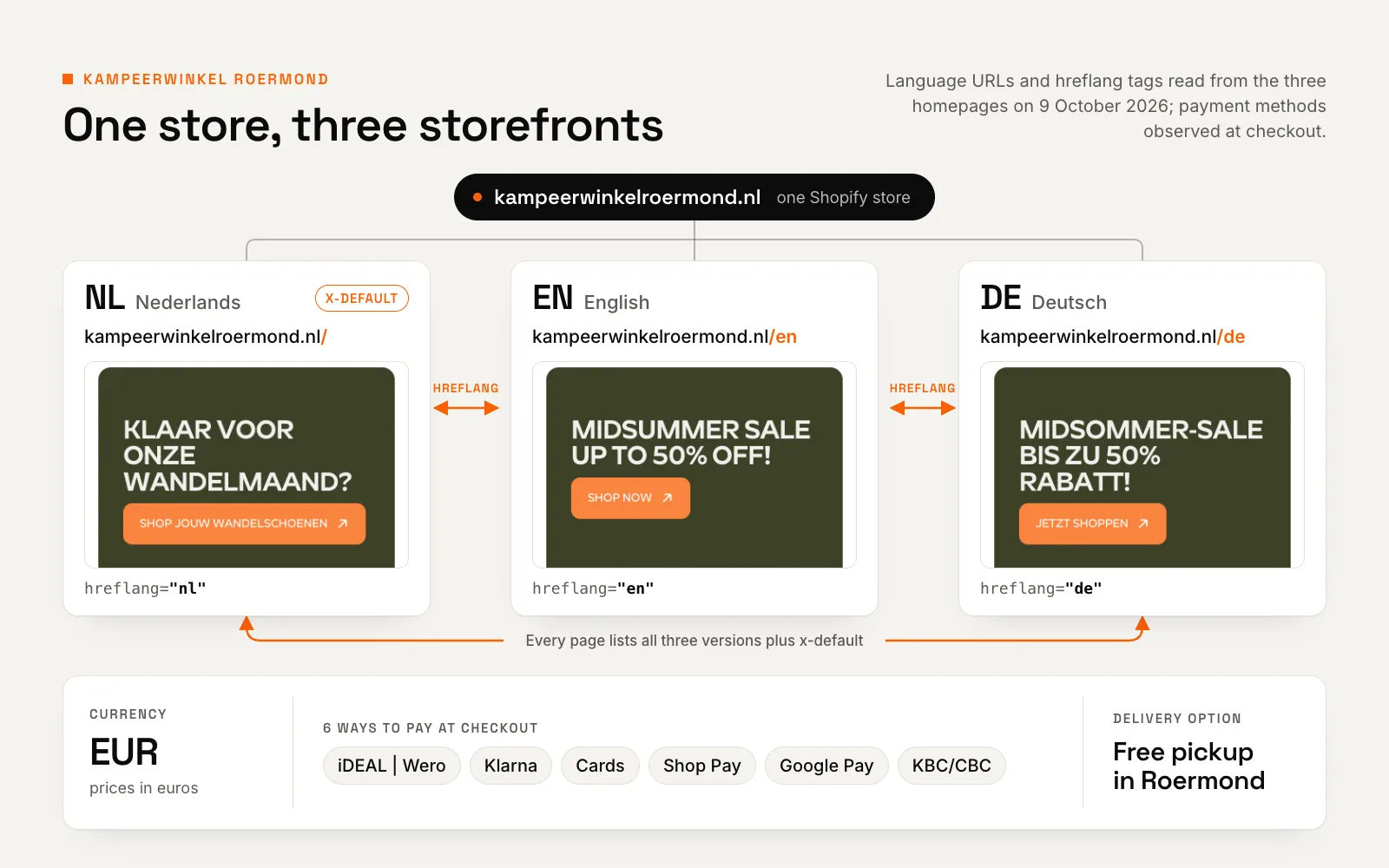
Subfolders, subdomains or country domains
Shopify’s guide to international SEO for markets is direct: “Subfolders are recommended for most stores”. They need no extra domain and share your main domain’s authority. Some search engines treat subdomains as separate sites, and country domains such as yourstore.de send the strongest local signal but must each be registered, run and built up.
Our default is subfolders on the existing domain, with one nuance: Google lists “Can only target a single country” as a drawback of country domains. A .nl domain with a /de folder suits a store where Germans are a secondary audience. If Germany will become a main market, weigh a .com with subfolders or a separate .de before launch.
hreflang, x-default and sitemaps
Shopify adds hreflang tags automatically, but only “for markets that have a distinct domain, subdomain, or subfolder”, plus an x-default that points to your primary domain. Its sitemaps carry the same annotations.
Google’s rules for localised versions require every version to list itself and all the others, and “If two pages don’t both point to each other, the tags will be ignored.” Shopify’s tags meet both rules. Trouble starts when a theme or app adds its own.
One set of hreflang tags, not two
If a theme or app adds hreflang tags while Shopify’s are on, every page carries two sets that can disagree, even on a trailing slash, and nothing on screen looks wrong. Turn Shopify’s tags off only when another implementation replaces them, and check the source of one page per language before launch.
Don’t auto-redirect shoppers
Google’s multilingual guidance says not to redirect “based on what you think the user’s language may be”. Googlebot usually crawls from the USA without an Accept-Language header, so such redirects can hide versions from search. Shopify spares known crawlers from automatic redirection, not shoppers. We prefer no forced redirect: serve the language the URL asks for, offer a dismissible suggestion at most, and keep the switcher in sight.
Translation that reads like a local wrote it
Translate & Adapt, a translation app or CSV
Shopify offers three routes: its free Translate & Adapt app, with manual or automatic AI translation; a compatible third-party app; or CSV import. Stores located in the Netherlands, Belgium, Germany, the UK and eight other countries can translate up to 8 languages automatically and keep them current with an optional weekly Auto-sync. Most stores elsewhere get 2. Translations you edited by hand are never overwritten.
Treat machine output as a first draft, and write or review by hand everything that sells or carries risk, from the homepage and buttons to size guides and returns.
What usually gets missed
- URL handles. Automatic translation doesn’t include URL handles, so add them per language. Settle them before launch: after a handle change, redirects aren’t supported for language-specific URLs.
- Legal policies. Shopify can’t translate them automatically and suggests a professional translator.
- Tags. They can’t be translated, so don’t show them to shoppers or build filters on them.
- App content. Translate & Adapt can’t translate third-party app content that sits outside Shopify’s translatable resources. Check reviews, cart drawers, chat and cookie banners one by one.
- Email notifications. They go out in the language of the order when a translation exists, so translate and preview each one.
- Images and specs. Theme images can have a version per language, but product images can’t, so keep words out of product photos. Check spec metafields and size guides too.
Native review for every language
Missing translations fall back to the default language, so a half-finished German page quietly mixes in Dutch. Google’s guide also recommends “using a single language for content and navigation on each page”. Give a native speaker the pages that sell and a short style sheet: je or u in Dutch, du or Sie in German, price and size formats, and which product terms stay in English.
Translate the path to checkout first
Start with the header, footer, cart, checkout notes, shipping and returns, then your best-selling collections. A fully translated path to checkout beats a store that is half translated everywhere.
A theme built for three languages
A language switcher people can find
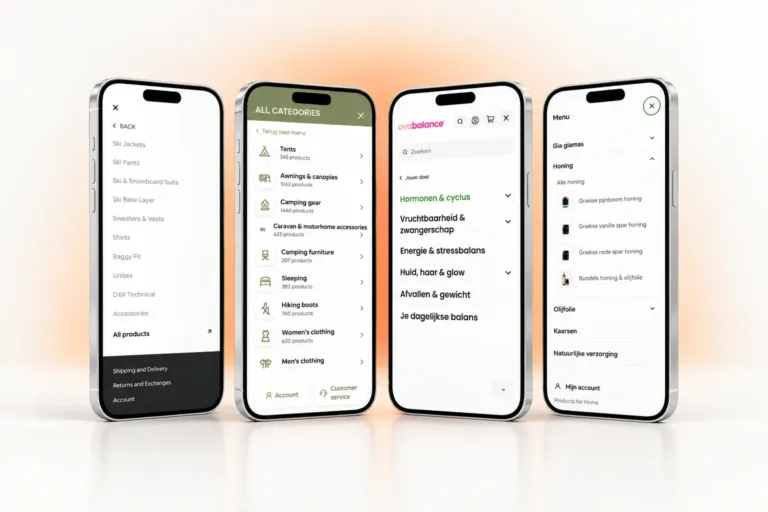
Shopify requires a language selector in your theme. Kampeerwinkel Roermond’s three storefronts share one compact switcher, a small web component in our custom theme. Put yours in the header and the footer, name each language in that language (Nederlands, English, Deutsch) and skip flags: a flag stands for a country, not a language, and a Belgian shopper may want Dutch or French.
In a custom Liquid theme, build every internal link with the routes object. Shopify’s Liquid reference says it “helps ensure that your theme supports multiple languages”.
{%- comment -%} Hard-coded: drops the /de or /en folder {%- endcomment -%}
<a href="/cart">Cart</a>

{%- comment -%} routes: keeps the shopper in their language {%- endcomment -%}
<a href="{{ routes.cart_url }}">Cart</a>
Layouts that survive longer German words
German labels tend to run longer: ‘Add to cart’ becomes ‘In den Warenkorb’. Design buttons, menus, filter labels and product cards for your longest language, and review every template on a phone in each language before sign-off.
Search and filters in every language
Predictive search offers query suggestions only when both the store’s primary language and the shopper’s language are English, and collection suggestions match the primary language only. In Search & Discovery filters, the tag filter appears only in the default language, vendor values are never translated, and the price filter disappears in any other currency.
Shopify suggests metafield filters for better translation support. Our guide to Shopify product filters and search covers the detail.
Planning a custom Shopify theme for more than one language?
We start with your market and language grid, then plan the switcher, templates and search around the longest language you sell in.
Payments, prices and VAT for European shoppers
Local payment methods, country by country
In Shopify Payments, local payment methods appear only when a customer is in a supported country and pays in an eligible currency, and countries outside your business location must be set up as markets. iDEAL | Wero is shown “only when the customer has a Netherlands address and checks out in EUR”. Bancontact works only for customers in Belgium paying in euros.
A German shopper sees neither. So match the payment marks in your cart and footer to each market, and test checkout with a Dutch, a Belgian and a German address. Kampeerwinkel Roermond’s checkout offers six ways to pay, including iDEAL | Wero and Belgium’s KBC/CBC.
Price rules and VAT across borders
Shopify’s international sales tools page summarises the EU Price Indication Directive: an announced price reduction must show “the lowest price previously charged for a product within the last 30 days”. If your primary market is outside the EEA, as it is for a UK brand, Shopify hides compare-at prices from EEA customers by default.
€10,000
The annual threshold for a seller established in one EU country: once its combined distance sales of goods and telecom, broadcasting and electronic services to consumers in other EU countries exceed it, VAT is due in the customer’s country.
Source: European Commission, VAT One Stop Shop (accessed October 2026)
The threshold has covered distance sales of goods since 1 July 2021. Above it, the One Stop Shop lets you declare that VAT in one quarterly return in a single member state instead of registering in each country. Shopify sets taxes per market; ask your accountant which scheme applies, as this is general information, not tax advice.
Delivery and pickup promises per market
Free-delivery thresholds can differ by country. On Products for Home, a WooCommerce store we built, delivery is free from €60 in the Netherlands and €70 in Belgium, and the cart’s progress bar knows which applies. Kampeerwinkel Roermond also offers free pickup from its Roermond store at checkout. On Shopify, make every free-shipping message read the shopper’s market, never a hard-coded number.
Two three-language stores we built
Kampeerwinkel Roermond: one store, three storefronts
Kampeerwinkel Roermond serves very different shoppers at once: locals who prefer to collect in store, Dutch and Belgian shoppers who expect their usual payment methods, and German and English-speaking visitors who need their own language. We designed and developed Kampeerwinkel Roermond’s three-language store as a custom theme on Shopify’s Horizon foundation, running more than 9,400 products through Shopify Markets, each storefront on its own URLs.
Case study · Shopify · Netherlands, Belgium & Germany
Kampeerwinkel Roermond: a Shopify camping store
9,400+ outdoor products made easy to find, buy and collect, in three languages and with free pickup in Roermond.
- 3 storefront languages: Dutch, English and German
- 6 ways to pay at checkout, from iDEAL, Klarna and cards to Shop Pay and Google Pay
- 9,400+ products online, every one on the same set of templates
Rehall: one store for three countries
Rehall, a Dutch skiwear brand, sells across the Netherlands, Belgium and Germany in English, Dutch and German. We did its Shopify build and app integration from an approved design.
Nine third-party apps run in its live theme, including Rebuy, Gorgias and Judge.me, and most put text in front of shoppers. Shopify warns that some apps don’t support multiple languages by default, so check each app’s language support before adding a language.
Launch checklist for a multi-language Shopify store
Run it before you publish a language, and again after any theme or app update.
- Market grid: every country you sell to, with its languages, currency, payment methods and delivery promise.
- URLs: a subfolder or subdomain per language, translated handles for your main pages, no language switching by cookie alone.
- hreflang: one complete set per page in the source of each language, with an x-default and no duplicates from apps.
- Translations: policies, notifications, metafields, guide pages and every app widget, not just products.
- Switcher and links: in the header and footer, languages named in their own language, links built with
routes. - Search and filters: a real query and a filtered collection tested in each language and currency.
- Checkout and VAT: test orders with Dutch, Belgian and German addresses; tax settings reviewed by your accountant.
- After launch: indexing and queries checked in Search Console per language folder.
The order matters more than the tools: decide markets and URLs first, translate the path to checkout next, and test every country’s checkout with a real address. It is the order we follow in our Shopify development for European brands. If the new languages arrive with a full rebuild, our website redesign checklist covers the rest, from platform choice to redirects.
Selling into the Netherlands, Belgium or Germany next?
Send us your markets, languages and payment methods. We’ll agree the structure, translation workflow and scope with you before the build starts.
Frequently asked questions
Does Shopify support multiple languages?
Yes. You can sell in up to 20 languages on the Basic, Grow, Shopify and Advanced plans, and up to 30 on Shopify Plus (October 2026). Each published language gets its own URLs, the checkout has pre-translated content for 33 languages, and your theme needs a language selector.
Is Shopify Translate & Adapt free, and what are its limits?
Yes, the app is free. Stores located in the Netherlands, Belgium, Germany, the UK and eight other countries can translate up to 8 languages automatically; most stores elsewhere get 2. It can’t translate tags, product images or third-party app content outside Shopify’s translatable resources. URL handles have to be added by hand, and legal policies can’t be translated automatically.
Does Shopify add hreflang tags automatically?
Yes, for markets with a distinct domain, subdomain or subfolder. Every page gets tags for all its language versions plus an x-default pointing to your primary domain, and the sitemaps carry hreflang annotations. If a theme or app adds its own tags, you get duplicates: keep one implementation and turn Shopify’s off only if another replaces it.
Do I need a separate Shopify store for each country?
Usually not. One store with markets sets currency, languages, pricing, domains and product availability per country, with one catalogue and one theme to maintain. Separate stores make sense for independent country teams, or for different legal entities, warehouses or ranges. Decide before the build, because switching later means moving content and URLs.