

In this article9 sections
Key takeaways
- Shopify product filters and search decide whether shoppers find the right product in a large catalogue, so plan them with the theme, not after launch.
- Native filters cover many stores, but stop at 25 filters, vanish on collections over 5,000 products and filter by price only in the default currency.
- Start with product data: store the attributes people shop by in metafields before you choose a filter tool.
- Test predictive search in every storefront language: in our tests, query suggestions came only from the primary language, and compound words tripped up matching.
- Add a filter app only when a native limit blocks a real need, and agree a page-weight budget first.
Shopify product filters and search matter because they are how shoppers get from a large catalogue to the one product they need. When the theme is built around them, people narrow thousands of items in a few taps. When they are bolted on later, shoppers meet empty results, hidden sizes and filters nobody uses.
Picture a shopper on a camping store with more than 9,400 products who needs a tent for four. Whether they find it depends on decisions made when the theme was built. For teams planning a Shopify build or rebuild, this guide covers how filtering and predictive search work today (checked October 2026), where the native tools stop, and how we plan both, with examples from Dutch stores we have built.
Why filters and search are a theme decision, not an app toggle
Two ways shoppers narrow a catalogue
Shoppers either browse a collection and filter it, or type what they want. In Baymard Institute’s large-scale usability testing, roughly half of participants preferred search and the other half the main navigation, so neither route can be an afterthought.
Both depend on clean product data, a theme that renders filters and results well, and clear decisions about what a phone screen shows first. That is why we scope them with the templates, not as plug-ins added later.
What goes wrong when they are an afterthought
The failures are familiar: filters for attributes nobody shops by, a size that turns out to be sold out only after the click, a search that returns nothing for a model name or a Dutch product word. They are common, too. The same Baymard article (updated April 2026) rates search UX as “mediocre or worse” overall on 46% of desktop sites and 58% of mobile sites.
67–90%
Abandonment Baymard saw on sites with mediocre product list usability, against 17–33% on sites with a slightly optimised toolset, for users looking for the same types of product.
Source: Baymard Institute, E-Commerce Product Lists & Filtering UX research (page accessed October 2026)
How Shopify product filters work today
Native filtering runs through Shopify’s free Search & Discovery app: you choose the filters there, and the theme decides whether and how they appear. If the theme doesn’t support filtering, Shopify’s Search & Discovery filter guide says your filters are saved but never shown to customers.
The filter types you can use
Every store gets standard filters for availability, category, price, product type, tags and vendor. Custom filters use product options such as size, or product, variant and category metafields, including metaobject references for visual filters such as colour swatches. Shopify’s own example, a watch store filtering by dial size and water resistance, works only when those values sit in metafields or options, not in the description.
The limits that shape a larger catalogue
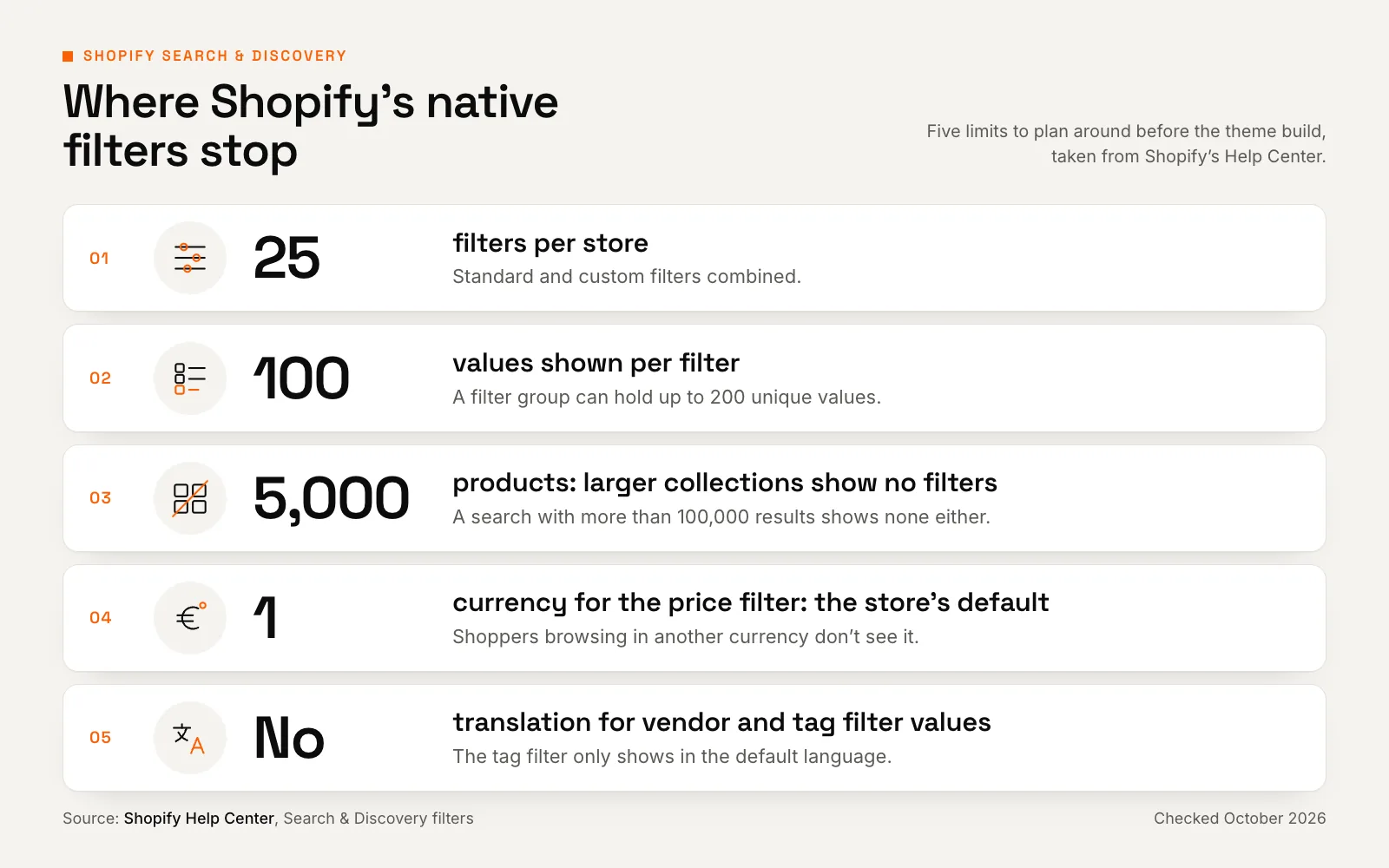
At the time of writing (October 2026), Shopify lists these limits:
- A maximum of 25 filters per store, standard and custom combined.
- No filters on collections with more than 5,000 products, or on searches with more than 100,000 results.
- At most 100 values displayed per filter on the storefront.
- No price filter for shoppers browsing in a currency other than the store’s default.
- No translations for vendor and tag filter values, and the tag filter only appears in the default language.
What your theme has to support
In Shopify, different filters combine with AND and, by default, the values within one filter with OR, and each applied filter is written into the URL, for example filter.p.product_type=shoes, as Shopify’s storefront filtering documentation explains.
The theme turns that into an interface: a good one shows how many products each value returns, stops values with no results from being clicked, and removes an applied filter in one tap. Swatches need theme support for the filter value API. In Liquid, the core logic is short:
{% for filter in collection.filters %}
  {% if filter.type == 'list' %}
    <h3>{{ filter.label | escape }}</h3>
    <ul>
      {% for value in filter.values %}
        {% if value.active %}
          <li><a href="{{ value.url_to_remove }}">{{ value.label | escape }} ({{ value.count }}) ×</a></li>
        {% elsif value.count > 0 %}
          <li><a href="{{ value.url_to_add }}">{{ value.label | escape }} ({{ value.count }})</a></li>
        {% else %}
          <li>{{ value.label | escape }} (0)</li>
        {% endif %}
      {% endfor %}
    </ul>
  {% endif %}
{% endfor %}
Filter URLs matter for SEO too. Google’s guidance on faceted navigation warns that URL-parameter filters “can generate infinite URL spaces”. Shopify’s default robots.txt keeps filtered collection pages from being crawled, yet the robots.txt files on stores we built block a filter URL only once it combines two or more filters. Decide which single-filter pages you want found.
Filters built on product data: the Rehall example
Rehall designs technical ski and snowboard outerwear and sells it across the Netherlands, Belgium and Germany. We built its Shopify store from an approved design and integrated its apps (see the Rehall case study).
Filter on how people actually buy
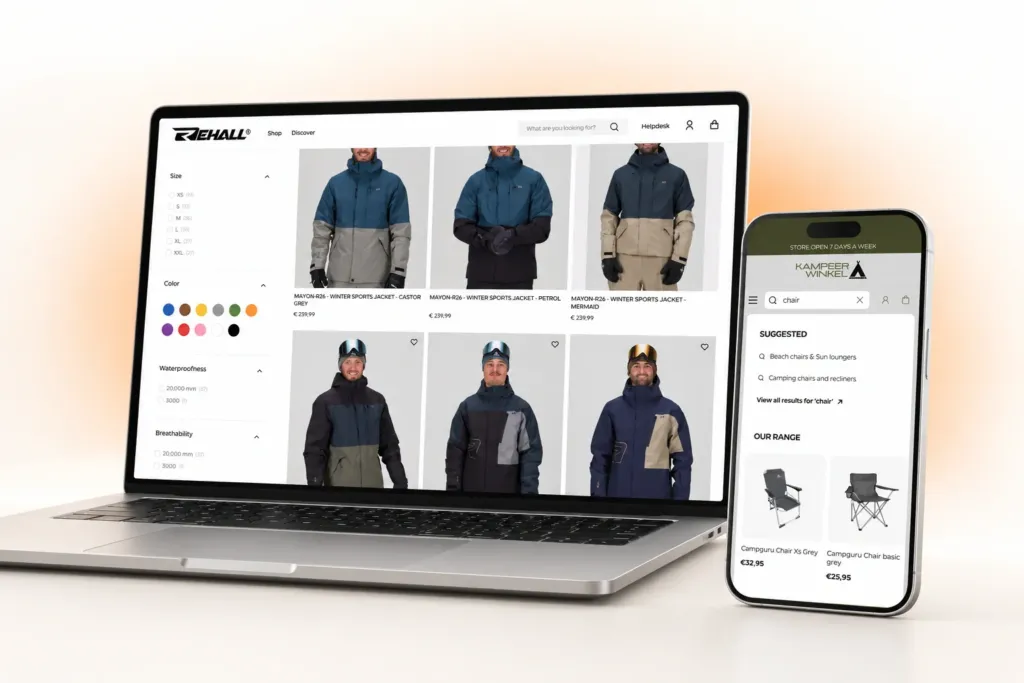
People choose skiwear on performance. A filter app, styled into the theme and fed with Rehall’s product data, lets shoppers narrow by size, colour swatch, waterproofness in mm, breathability and details such as a snow skirt or a ski-pass pocket. Above the grid, tiles for the Regular, Baggy and DXR fits put the biggest style choice in view before anyone opens the filters.
Spec filters need plain language. A 20,000 mm water column means little to most shoppers, and Baymard’s research on industry-specific filters found unclear filter labels on 62% of the sites it benchmarked. Rehall’s product pages turn the same data into visual meters for warmth, breathability and water resistance.
Show stock before the click
Rehall’s size filter shows live stock counts, and its product pages strike through sold-out sizes. A count or a clear disabled state beats a page of zero results.
Native metafield filters or a filter app?
Rehall uses a filter app; many stores don’t need one. Filters are only as good as the product data behind them, so start with the data and choose the tool second, using these questions:
| Native filters are usually enough | Time to evaluate an app or custom work | |
|---|---|---|
| Number of filters | 25 filters cover how people shop | You need more than 25 across the store |
| Collection size | Collections stay at 5,000 products or fewer | Key collections go above 5,000 |
| Values per filter | 100 or fewer, or values you can group | Brand or size lists stay above 100 |
| Currencies | Price filtering matters only in the default currency | Shoppers in other currencies must filter by price |
| Languages | Values come from translated options or metafields | Vendor or tag values must appear translated |
| Page weight | No extra filter scripts on collection pages | Only if the app fits an agreed page-weight budget |
Filters are only as good as the product data behind them, so start with the data and choose the tool second.
Predictive search: the shortcut for shoppers who know what they want
What Shopify’s predictive search actually searches
Predictive search is the panel that answers as the shopper types. Shopify’s Predictive Search API reference says product results always search all product fields, including tags, vendor, variant titles, SKUs, barcodes and product category. If you have read that it ignores SKUs, that is out of date: a SKU search on a store we built found the right product in October 2026.
By default, the panel returns 10 results in total across all result types; a theme can request up to 10 per type instead. Partial matching applies only to the last word typed and only from the start of a word (Shopify’s example: ‘book’ won’t find ‘ebook’), and typos are forgiven only when the first four letters are right.
Shopify’s semantic search, which widens the full results page with related words and concepts, doesn’t apply to predictive search.
The multilingual catch for European stores
Shopify’s predictive search guide says query suggestions are currently available in English, with more languages rolling out, and that collection suggestions use the store’s primary language. Live stores are ahead of that page. When we tested stores we built in October 2026, Dutch-primary Kampeerwinkel Roermond suggested Dutch search terms, and its German storefront offered the translated Zelte (tents) collection for ‘zelt’; Rehall’s Dutch and German storefronts matched translated collection titles too.
Two catches remained. Query suggestions came only from the primary language: an English shopper typing ‘tent’ was offered ‘tentstokken’ (tent poles), and German shoppers saw none. And because matching works only from the start of a word, ‘stoel’ (chair) didn’t suggest the Strandstoelen (beach chairs) collection, and ‘Stuhl’ didn’t suggest Campingstühle. Dutch and German are full of compound nouns like these.
Test search the way shoppers type
Baymard groups searches into eight query types, from exact model names and product types to features, abbreviations and symptoms. Run a few of each in every storefront language before launch, include compound words, and log every query that returns nothing.
Design the results panel, not just the input
On Rehall, typing opens query suggestions on the left and live product results on the right, with sale prices, star ratings and a View all shortcut. On Kampeerwinkel Roermond, typing ‘chair’ suggests whole collections first, such as Beach chairs & Sun loungers, then a View all results link and product cards with prices.
Collections first suits a broad catalogue, and Baymard’s query-type research recommends sending product-type searches to the matching category when the match is certain.
How Kampeerwinkel Roermond makes 9,400+ products findable
Kampeerwinkel Roermond is a camping, outdoor and winter sports specialist with a showroom a few kilometres from the German border. We designed and developed a 9,400-product Shopify camping store for it, with 14 departments and storefronts in Dutch, English and German.
Departments first, then filters
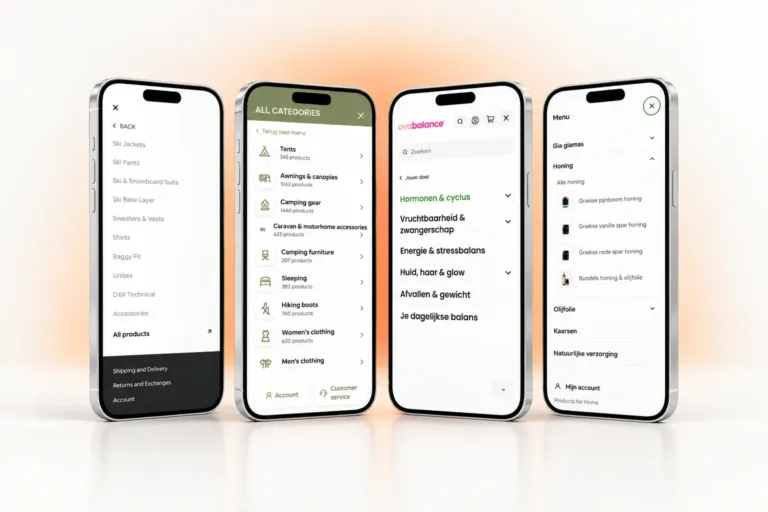
Shoppers start broad. The All Categories menu shows the 14 departments as cards with their product counts, and hovering a card opens its sub-categories. Collections then narrow by brand and price, with live counts from a filter app: department, then type, then brand and price, the way people shop for camping gear.
Keep collections small enough to filter
Any all-products view of a 9,400-product range crosses the 5,000-product line, so native filters would not appear there. Departments and sub-collections keep each list filterable and meaningful: Camping gear showed 1,440 products when we documented the build.
Native filters vanish above 5,000 products
Check your largest collections before you design the filter layout, including automated sale and new-in collections that grow quietly.
For shoppers who would rather type, a full search field stays in the phone header as the page scrolls.
Case study · Shopify · Netherlands, Belgium & Germany
Kampeerwinkel Roermond: a Shopify camping store
9,400+ outdoor products made easy to find, buy and collect, in three languages and with free pickup in Roermond.
- 9,400+ products online, every one on the same set of templates
- 14 departments in the All Categories menu, each showing its product count
- 3 storefront languages: Dutch, English and German
Mobile filtering that works with the thumb
On a phone, filters compete with products for space. On Ovabalance, a Dutch women’s health brand with 43 products whose store we designed and built, the collection page opens with goal chips that fold away behind ‘Toon meer’ (show more). One ‘Verfijnen’ (refine) button then opens filters for availability, price, goal, ingredient and type.
That puts the most important choice up front, which many stores don’t. Baymard’s research on promoting filters found that 61% of sites don’t promote filters in the product list, and its research on applied filters found that 28% show no overview of applied filters. On mobile, keep applied filters visible above the grid and show the result count before the shopper closes the panel.
Is your catalogue outgrowing its filters?
Tell us how many products, languages and product attributes you sell. We’ll plan filters and search with you as part of the scope, before any build starts.
Checklist: filters and search for your next Shopify build
Work through this before the design phase, not after launch.
- Product data: map every attribute people shop by to a metafield definition with consistent values.
- Filter budget: choose the filters that earn their place within Shopify’s 25.
- Collection size: keep every collection you want filtered at 5,000 products or fewer.
- Languages: translate filter labels and values; use metafields instead of vendor or tag filters where every language matters.
- Currencies: decide what shoppers in a non-default currency see instead of the price filter.
- Empty values: set Search & Discovery to hide empty filter values or show them last.
- Search tests: run the query-type and compound-word checks from the tip above in every language, and give the no-results page a way forward.
- Monitoring: check the searches with no results report monthly (it excludes predictive search), and keep any app within its page-weight budget.
When to bring in a Shopify developer
Native filters and a well-built theme cover many stores. Bring in a developer when you see collections above 5,000 products, several storefront languages, products bought on specs, a slow filter app or common searches returning nothing. These are theme and data problems, easier to solve while the build is scoped than after launch.
Weighing a custom Liquid theme or a premium theme? Ask how each handles the limits above. For a wider rebuild, our website redesign checklist covers the rest.
Our Shopify development team plans filters and search as part of the theme build. Send us your catalogue details and we will show you where the native tools hold and where they need help.
Frequently asked questions
How do I add product filters to my Shopify store?
Install Shopify’s free Search & Discovery app, open Filters and add the ones you need, from price to product options and metafields. Your theme must support filtering to show them: if it doesn’t, a message appears in the Collection and search filters section under Content > Menus, and your filters are saved but not displayed.
Why are my Shopify filters not showing?
Usually because the theme lacks filter support, the collection has more than 5,000 products or the search has more than 100,000 results. A filter also appears only when it applies to products on that page, the price filter hides for non-default currencies, and the tag filter shows only in the default language. After adding metafield values, allow 24 to 48 hours for re-indexing.
Can Shopify filter products by metafields?
Yes. Search & Discovery can filter by product, variant and category metafields that have a metafield definition. Supported types are single line text, decimal, integer, true or false and metaobject references, plus list versions of text and metaobject references. Visual filters on custom metaobjects need storefront access on both the metaobject and the metafield definition.
What is the difference between predictive search and the search results page in Shopify?
Predictive search suggests products, collections, pages and search terms while the shopper types, 10 results in total by default. The search results page is the full list after pressing enter, and it is where filters apply. Shopify runs them on different search engines, so test both: the same query can behave differently in each.