


In this article9 sections
Key takeaways
- In a Figma to Webflow build, treat the approved file as the contract: sort out auto layout, layer names, styles, variables, real copy and every breakpoint first.
- Webflow’s plugin syncs auto layout frames, variables and styles, but not variants; responsive tuning, the CMS, forms, interactions and SEO are still built in Webflow.
- Build headlines, image masks and badges as real HTML and CSS, not exported images, so they stay editable, translatable and accessible.
- Model the CMS around what your team will change, because content editors can add items but cannot create new Collections.
- Test every breakpoint, form and 301 redirect, then hand over a site the client owns, with a short editor guide.
Figma to Webflow is the step where an approved design becomes a working website. Prepare the Figma file first, use Webflow’s plugin where it fits, build the rest natively in Webflow, model the CMS around what your team will edit, then test every breakpoint, form and redirect before handover.
An approved Figma file is a promise; the build decides whether it survives. This guide, for marketing leads, founders and design studios with a signed-off design, covers what to fix in Figma, what to build by hand and how to hand over. It draws on our build for Flow Storage, a self-storage company near Roermond, where we turned an approved design into the live Webflow site, with development led by our founder Akib Zawayed.
What Figma to Webflow really involves
There are three routes: Webflow’s Figma to Webflow plugin and app, a manual rebuild in the Webflow Designer, or a mix of both, where the design system is synced and pages, states and edge cases are built natively.
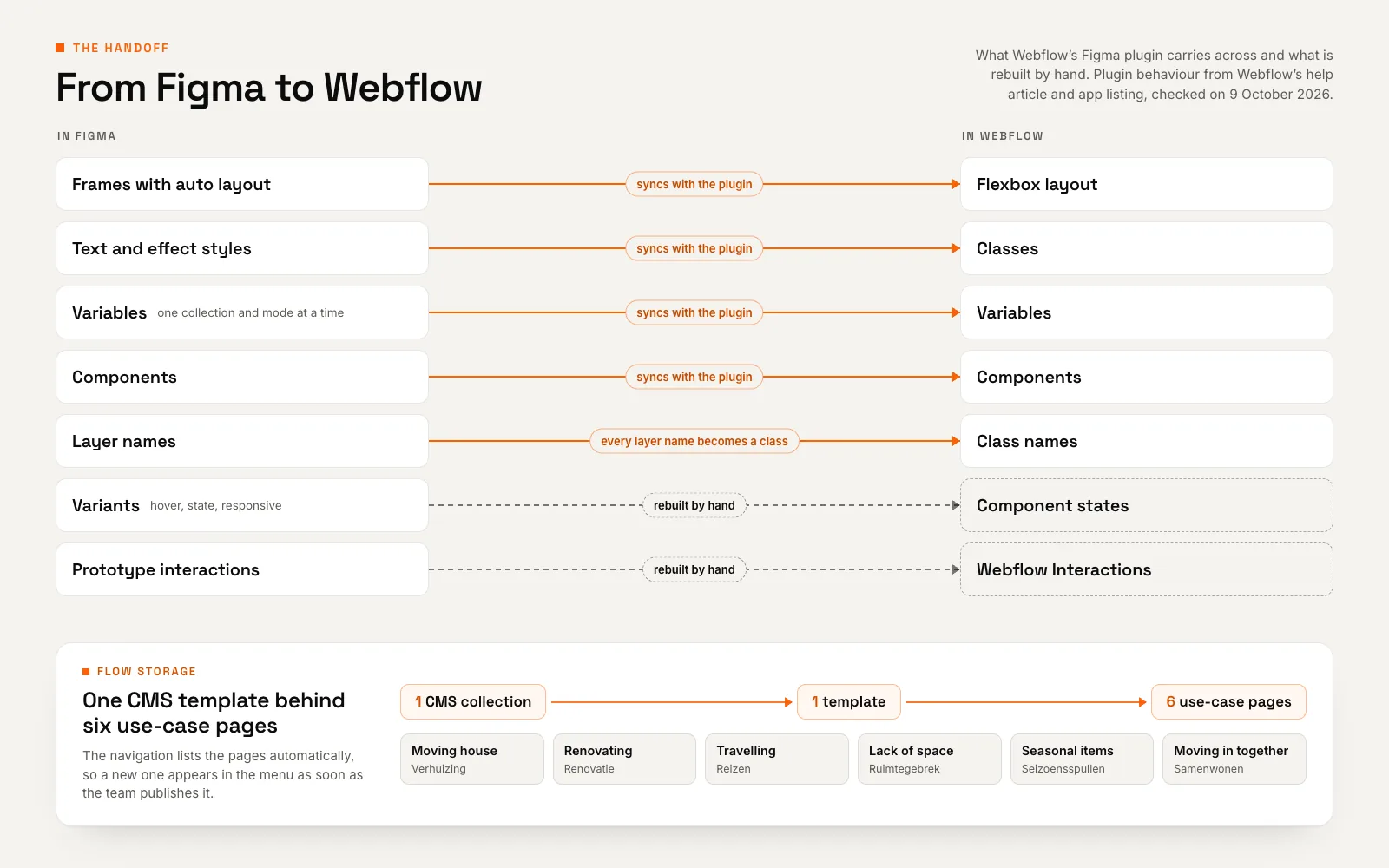
The plugin has clear rules, set out in Webflow’s help article on the plugin and app: layers without auto layout do not sync, every layer name becomes a class, and variants are not supported. Newer AI tooling such as the Webflow MCP server “connects agents and AI tools directly to your Webflow projects”, but Webflow states that it “cannot automate all Webflow developer tools”.
The design file has limits too. Webflow’s write-up on its Figma translation engine notes that vector graphics tools “don’t capture the dynamic and interactive nature of the web”. And no tool decides which content belongs in the CMS, how a form routes leads or how the site is handed over. If your Figma file describes a logged-in product rather than a marketing site, first decide whether you need a website or a web application.
| Figma to Webflow plugin | Manual build in Webflow | |
|---|---|---|
| What it needs | Frames and components with auto layout; layers without it do not sync | Any well-organised Figma file, including masks and layered artwork |
| Class names | Every Figma layer name becomes a class | Named to an agreed convention from the first class |
| Variants and states | Not supported; separate frames become separate elements | Hover, focus and active states built into each component |
| Responsive behaviour | Choose the breakpoint where a layer stacks; finer behaviour is set by hand | Tuned and checked at every breakpoint |
| Best used for | Syncing a design system and simple sections, a few at a time | Intricate layouts, CMS templates and anything with states |
Prepare the Figma file before anyone opens Webflow
Most build problems start in the file. Fix them in Figma, where a change costs minutes, rather than in Webflow, where it can cost a rebuild.
Auto layout everywhere
Auto layout is Figma’s version of flexbox. Figma’s guide to auto layout explains that when content changes, “the layout adjusts without requiring manual repositioning”. That mirrors how a web page behaves; loose, absolutely positioned layers do not.
Webflow’s engineers translate only auto layout layers “to avoid non-deterministic output”, and ask designers to convert groups to auto layout, “otherwise we will have to turn them into SVG”. An unconverted group is how a headline ends up as a graphic.
Styles and variables that map to Webflow
Define colours, spacing and type once, as Figma variables and text styles. The plugin exports text and effect styles to Webflow classes and syncs variables one collection and mode at a time. Upload custom fonts to Webflow before transferring anything; otherwise, Webflow warns, “they’ll be lost during sync”.
Name layers on purpose. The plugin turns layer names into classes and assigns HTML tags from them: a layer called “heading” becomes an H1, so ten heading layers on one page means ten H1s to fix. Frames left as “Frame 12” become classes that Webflow University warns “won’t be ideal” once you manage styles.
Components, variants and real content
Build buttons, cards and navigation as components, but expect to rebuild their states. On variants, Webflow’s help article is blunt: “No. Variants are not currently supported.”
Design with real copy at real lengths. Placeholder text hides the problems Dutch and German create: Flow Storage’s mobile menu has a group called “Opslagmogelijkheden”, a single 19-letter word that has to fit a phone screen. Design desktop, tablet and phone at minimum, plus the error and success states of every form.
The build: matching the design 1:1
On Flow Storage, we treated the Figma file as the contract. We matched type styles, spacing values and interactions 1:1 in Webflow, then checked the build at every breakpoint, from ultra-wide monitors to phones. “Pixel-perfect” only means something if someone checks the widths the designer never drew.
Build it natively, don’t flatten it
The Flow Storage hero was the test: photography cut into the lightning-bolt logo, a white and sage two-tone headline, an orange “per dag” price roundel and layered USP cards. Rather than exporting it as one image, we built every part natively in Webflow, so the headline stays live text and the layout reflows on a phone.
Accessibility points the same way. WCAG 2.2 success criterion 1.4.5, Images of Text (Level AA) asks for text rather than images of text whenever the technology can achieve the visual presentation; logotypes are the exception.
A flattened hero is a false shortcut
An exported image looks right at one width only. It cannot reflow, be translated or be edited by your team.
A class system the next developer understands
Agree a naming convention before the first class. Documented systems such as Finsweet’s Client-First are one option; a short, written in-house convention is another. Either way, reuse global classes for type and spacing instead of letting duplicates such as “Button 2” pile up.
Interactions rebuilt in Webflow
Figma prototype interactions are a reference, not code. Rebuild the ones that earn their place and test each one by touch and keyboard. On the live Flow Storage site, a tabbed three-step rental journey (call, guided tour, contract) shows first-time renters how hiring works.
Model the CMS around what the team will change
List what the team will add or edit after launch: that is your CMS model. Webflow’s introduction to the CMS explains that Collection pages are created automatically for every item, and editing the template updates all of them.
Collections for repeatable pages
Flow Storage wanted a page for every reason people rent storage, and wanted to add new ones without calling a developer. One CMS collection now drives six use-case pages: moving house, renovating, travelling, lack of space, seasonal items and moving in together. They share a single template, and the menu pulls them from the CMS, so a newly published use case shows up in the navigation straight away.
The test is simple: if pages share a structure and the team will add more, they belong in a collection. A one-off About page does not.
Reusable proof: reviews from the CMS
We mapped the content the team would change, including customer reviews, into the CMS. On the live site, those reviews appear in a swipeable slider next to the Google rating, on service and use-case pages alike. Update a testimonial at the source and, in Webflow’s words, “every reference to the testimonial is automatically updated across your site”.
Check plan limits early
On Webflow’s pricing page (checked on 9 October 2026), Basic is “For simple sites that don’t need a CMS” and Premium lists 20,000 CMS items in up to 40 Collections. Content editors can add and edit Collection items but cannot create new Collections, so settle the collections during the build.
Case study · Webflow · Roermond, Netherlands
Flow Storage: a Webflow website built for enquiries
A pixel-perfect Figma-to-Webflow build for a self-storage company near Roermond, with a CMS the team runs itself.
- 1:1 Figma-to-Webflow fidelity: interactions, type and spacing
- 6 use-case pages generated from one CMS template
- 3 storage services with dedicated pages: containers, caravans, boats
Forms that deliver complete leads
A form in Figma is a picture of fields. In Webflow it needs validation, errors, a success state and a person who answers. Webflow’s engineers describe the same gap: forms “require error handling, validation workflow, and accessibility”.
Flow Storage rents units after a conversation and a visit to the site, so the contact page leads with a named person and a one-tap call button. Beside them, the enquiry form asks for a name, email address, phone number (with a +31 country selector) and message, plus a “Zakelijk klant?” checkbox that marks business enquiries.
The form runs on an embedded form builder, styled to match the brand, and every lead arrives with what the team needs to route it.
Ask only what routes the lead
Every field should help route or answer the enquiry. Next to the button, say briefly how you use the data, link your privacy policy and agree who receives each submission.
QA before launch: six checks on every template
Run these with real content before the domain goes live. For a wider relaunch, also work through our website redesign checklist.
- Breakpoints: check every page from an ultra-wide monitor down to a small phone, including the widths between breakpoints, with the longest real copy in each language.
- Performance: run Lighthouse on key templates before launch, where Total Blocking Time stands in for INP, then check field data against the Core Web Vitals thresholds on web.dev: LCP within 2.5 seconds, INP of 200 milliseconds or less and CLS of 0.1 or less, at the 75th percentile.
- Accessibility: one H1 per page, a logical heading order, alt text on content images, visible focus and keyboard access to menus, sliders and forms.
- SEO basics: a unique title and meta description on every static page and Collection template, plus an Open Graph image.
- Redirects: add a 301 for every old URL. Google’s guidance on redirects recommends a permanent server-side redirect “whenever possible”, and Webflow’s redirect documentation notes that its 301s “won’t apply to localized slugs or subdirectories”, so add separate rules for /nl/ or /de/ paths.
- Forms: submit every form on desktop and phone, and confirm the notification reaches the right inbox.
Handover: a site the team runs without a developer
Flow Storage’s team now publishes new use-case pages and fresh reviews through the CMS whenever it suits them. That is the test of a good handover.
Webflow’s content editor role is built for this: editors update copy, images, Collection items and each page’s SEO title and meta description, and publish if allowed, without touching the design. Specific elements can be locked through editing permissions.
We also recommend keeping the site in the client’s own Webflow workspace, with a one-page editor guide: how to add a Collection item, required fields, image sizes and who to call. From launch, Webflow is the source of truth; as Webflow University puts it, changes in Webflow “are not going to get transferred back to Figma”.
Have an approved Figma file?
Send it to us with your page list and what your team needs to edit. We’ll agree the build plan and scope with you before development starts.
A Figma to Webflow checklist for both sides
Share both lists at kick-off. Anything missed on the first list turns into rework on the second.
Designer side
- Auto layout: on every section and component, with no loose groups.
- Names: layers, styles and variables named as the classes should read; heading layers reflect their level.
- Tokens and fonts: colours, spacing and type defined once; web font files and licences ready.
- Breakpoints and copy: desktop, tablet and phone, with the longest real strings in every language.
- States: hover, focus, error and success states for buttons, forms and sliders.
- Content inventory: everything the team will add or edit after launch.
Developer side
- Build plan: what syncs through the plugin and what is built natively, agreed up front.
- Class convention: written down and used from the first class.
- CMS model: collections and templates mapped to the content inventory, plan limits checked.
- QA: breakpoints, Core Web Vitals, keyboard access, headings, alt text and meta data.
- Launch and handover: 301 redirects, forms tested end to end, a client-owned workspace and an editor guide.
The plugin gives a clean design system a head start; the file preparation, the CMS model and the handover decide the result. See how we approach Webflow development, read the Flow Storage Figma-to-Webflow case study, or send us your Figma file.
Frequently asked questions
Can you convert Figma to Webflow automatically?
Partly. Webflow’s plugin syncs auto layout frames, components, variables, and text and effect styles, but not variants. Responsive tuning, the CMS, forms, interactions and SEO are still set up in Webflow. AI agents using Webflow’s MCP server can take on more, though Webflow states it cannot automate every developer tool. Treat automation as a head start, not a finished site.
What does the Figma to Webflow plugin not do?
It does not sync variants or layers without auto layout, so hover and other states are rebuilt by hand, and custom fonts are lost unless they are uploaded to Webflow first. Its scope is layers, variables and styles: CMS Collections, form handling, redirects and page SEO settings are configured in Webflow.
How should I prepare a Figma file for a Webflow developer?
Apply auto layout to every section, name layers, styles and variables the way the classes should read, and define colours, spacing and type once. Design desktop, tablet and phone with real copy, draw button and form states, and list the content your team will edit after launch.
Can my team edit the Webflow site without a developer after launch?
Yes, if the site is built for it. Webflow’s content editor role lets your team update copy, images, Collection items and page SEO titles and descriptions, and publish if permitted, without touching the design. Editors cannot create new Collections or change the layout, so the developer should set up collections and editing permissions before handover.
Do I need a Webflow CMS plan for my site?
Yes, if your site has repeatable content such as blog posts, use-case pages or reviews. In October 2026, Webflow’s pricing page described Basic as the plan for simple sites without a CMS, while Premium includes the Webflow CMS with 20,000 CMS items. Check the current limits before you commit.