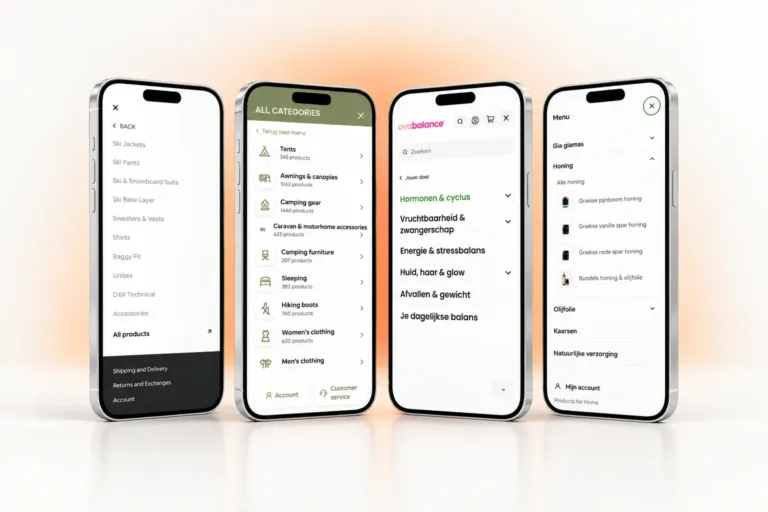


In this article10 sections
Key takeaways
- To increase average order value in WooCommerce, give each step one selling job: product card, product page, side cart, checkout and after the order.
- Compare AOV with your free-delivery threshold on the same VAT basis: WooCommerce reports AOV without taxes or shipping.
- Show the volume saving at the add-to-cart button and, in the side cart, the distance to free delivery for each country.
- Keep every checkout extra opt-in: EU law requires express consent for any extra payment, so a pre-ticked order bump can be refunded.
You increase average order value in WooCommerce by building the basket at every step, not by installing one upsell plugin. Show the saving for buying more on product cards and at the button, count down to free delivery in the cart, offer one relevant extra at checkout, then give shoppers a reason to return.
A jar that costs a few euros rarely covers its own delivery. For shops selling food, cosmetics, home goods or gifts, average order value (AOV), revenue divided by orders, decides whether delivery eats the margin. Below is the funnel we designed and built for Products for Home, a Dutch web shop for Mediterranean specialities, with real prices and the EU rules most plugin guides leave out.
Start with the numbers: AOV and your free-delivery line
Find the number you want to move before you add a plugin. WooCommerce shows it under Analytics > Orders, and the WooCommerce Analytics documentation defines Average Order Value as “Net Sales / Orders”. Net sales are gross sales minus returns and coupons, and gross sales exclude taxes and shipping.
Work out the gap between your AOV and free delivery
Now compare it with your free-delivery threshold. EU shoppers see prices including VAT: the Price Indication Directive defines the selling price as the final price “including VAT and all other taxes” (quoted in the European Commission’s guidance on Article 6a). Add VAT back to your AOV before comparing, or the gap will look bigger than it is.
Then divide the gap by the price of your most common item: that is how many extra items a typical order needs. At Products for Home, jars and bottles cost from a few euros and free delivery starts at €60 in the Netherlands and €70 in Belgium, so a one-jar order falls well short. There is no universal “good” AOV; your threshold and margin are the benchmark.
Why delivery cost is the biggest lever
Delivery cost is where low-ticket baskets fall apart, as Baymard Institute’s research into US cart abandonment shows.
40%
Extra costs too high (shipping, tax, fees): the most common reason US online shoppers gave for abandoning a cart, setting aside “just browsing”.
Source: Baymard Institute, 50 Cart Abandonment Rate Statistics 2026 (last updated 22 September 2025)
In the same list, 12% said “I couldn’t see / calculate total order cost up-front”. The data is from the US, but the principle applies to any shop that charges for delivery: a visible free-delivery line turns postage into a target to spend towards.
Give every step of the funnel one job
Most AOV advice is a plugin list, and shoppers meet it all at once: pop-ups on the product page and at checkout, a carousel in the cart. Plan it the other way round: map the five steps a shopper passes through and give each one a single selling job.
One job per step also gives you one number to watch per step: how often a tiered product sells in threes, how many orders reach free delivery, how many shoppers tick the order bump.
Step 1: product cards that sell from the grid
The first chance to sell a second item comes on the category page, long before the cart, so the product card has to carry the offer.
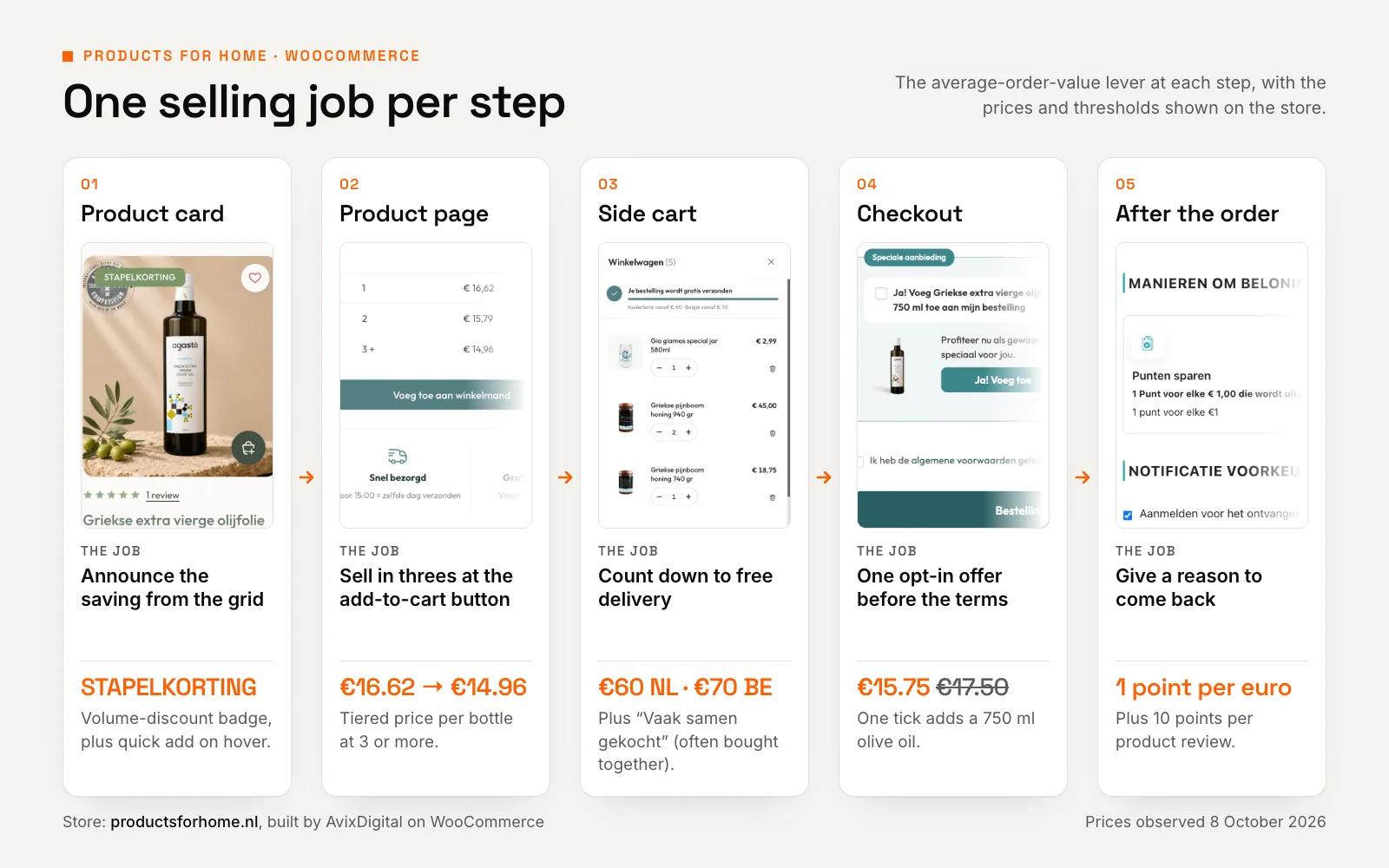
On Products for Home, cards with a volume discount carry a STAPELKORTING (volume discount) badge, beside a wishlist heart, the star rating and the was and now price including VAT. On hover, a round basket button adds the product without leaving the page. The badge announces the saving; the quick add saves a page load on every extra item.
Was and now prices follow a 30-day rule
Under Article 6a of the Price Indication Directive, inserted by Directive (EU) 2019/2161, the prior price shown with a reduction is the lowest price the trader applied in “a period of time not shorter than 30 days prior to the application of the price reduction”. Check that the price WooCommerce strikes through is that price. Member States may set different rules for perishable goods, so confirm with your adviser.
Step 2: tiered pricing at the add-to-cart button
A volume discount nobody sees until checkout never changes what goes in the basket. Put it where the quantity decision happens: directly above the add-to-cart button.
On the Products for Home olive oil page, a staffelkorting (tiered pricing) table takes a 750 ml bottle from €16.62 to €14.96 at three or more, about 10% off per bottle. Woo Discount Rules runs the logic; our product template decides where and how it appears. Keep tiers few and show each as a price per item, not only a percentage.
The same column answers the doubts that hold back a second bottle. The WebwinkelKeur score (a Dutch web-shop trust mark) sits under the title. Below the button come the payment methods, same-day dispatch before 15:00, free delivery from €60 (NL) or €70 (BE) and the loyalty points the order earns.
Volume tiers are treated differently. The Commission’s guidance calls “30 % off when buying three” a tied conditional offer: outside Article 6a, but still “fully subject to the UCPD”, the Unfair Commercial Practices Directive. The saving must still be real.
Step 3: a side cart that counts down to free delivery
A side cart, the panel that slides out when a product is added, keeps the shopper on the page and answers two questions: how far is free delivery, and what goes with this?
One bar, two countries
In WooCommerce, free shipping is a method you add to a shipping zone, with a requirement such as “A minimum order amount”. Each customer matches only one shipping zone, so the Netherlands and Belgium can each have their own minimum. A checkbox, “Apply minimum order rule before coupon discount”, decides whether coupons count; left unticked, WooCommerce uses the amount after the coupon.
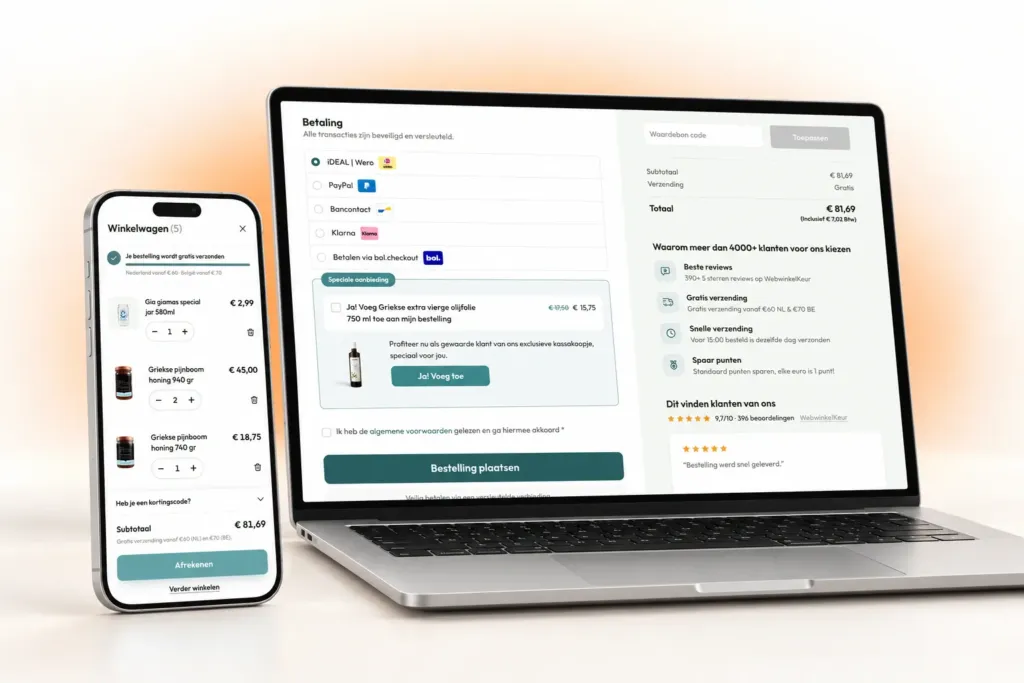
Nothing in those settings tells shoppers how close they are. That is a design job, using the same numbers as your zones. For Products for Home we re-skinned FunnelKit’s slide-out cart and added our own free-shipping progress bar, which knows the Dutch (€60) and Belgian (€70) thresholds. We built a similar free-shipping bar on Shopify for Kampeerwinkel Roermond, counting down to €100.
Settle the coupon rule before designing the bar
If the threshold is checked after coupons, the bar must recalculate when a code is applied, or shoppers see “free delivery” in the cart and pay for it at checkout. That costs more trust than having no bar.
Cross-sells where the decision happens
WooCommerce defines up-sells and cross-sells differently: up-sells are “products that you recommend instead of the currently viewed product”, while cross-sells are “products that you promote in the cart based on items the customer has already added”, which, depending on the theme, appear on the cart page.
A side cart that leads straight to checkout makes that page easy to skip, and the cross-sells on it go unseen. So on Products for Home they live in the side cart: a “Vaak samen gekocht” (often bought together) column with one-click Toevoegen (add) buttons.
| Up-sell | Cross-sell | Order bump | |
|---|---|---|---|
| What it does | Suggests a better or pricier alternative | Suggests a complementary product to add | Offers one extra the shopper adds with a tick |
| Where WooCommerce puts it | Product page, below the description (theme-dependent) | Cart page, below the products table (theme-dependent) | Not in WooCommerce core; needs a checkout plugin such as FunnelKit, or custom code |
| Best placement | Product page, before the decision | Side cart, right after an add | Checkout, near the payment options |
| Main risk | Distracts from what the shopper came for | A carousel nobody scrolls | Feels like a trick if pre-ticked |
Step 4: a one-page checkout with a last, opt-in offer
WooCommerce core has no order bump, so this step needs a checkout plugin or custom code. For Products for Home we set up a branded one-page FunnelKit checkout with three delivery options: home delivery, a DHL ServicePoint or collection in Alphen aan den Rijn.
The order bump: relevant, cheaper and never pre-ticked
Just before the terms, a “Speciale aanbieding” offers a 750 ml olive oil for €15.75 instead of €17.50. One tick adds it, and three more one-click add-ons sit beside the basket. It is a fair offer: it fits the range, shows its saving openly and starts unticked.
Pre-ticked extras can be refunded
Article 22 of the Consumer Rights Directive says the trader “shall seek the express consent of the consumer to any extra payment”. If consent was inferred from default options the consumer had to reject, they are entitled to reimbursement. This is general information, not legal advice: check national rules with your adviser.
Fewer exits, local payment methods
Every link out of the checkout is an exit, so ours has no menu. Payment choice matters too: in the same Baymard research, 9% gave “There weren’t enough payment methods” as a reason. For Dutch and Belgian shoppers that means local methods, and Products for Home offers five: iDEAL | Wero, PayPal, Bancontact, Klarna and bol.checkout.
Next to the total sit a trust column and a live review slider, so the last thing a shopper reads before paying is what other customers thought.
Want bigger baskets without discounting everything?
We’ll map your WooCommerce funnel step by step with you and agree what to build, from product cards to checkout, before any work starts.
Step 5: after the order, a reason to come back
A loyalty scheme belongs in an AOV funnel when the reward grows with the basket. Products for Home runs WPLoyalty: one point per euro spent and ten more per product review. The product page shows the points an order will earn while the shopper is still choosing how much to buy, and the balance gives them a reason to come back.
Points sit outside the 30-day rule too: the Commission’s guidance excludes loyalty programmes that “allow accumulation of credits (points) for future purchases”. A members-only sale open to many or most customers still needs the prior price.
What the funnel added up to, and how to keep it fast
Each step on its own is modest: a badge, a table, a bar, a tick box, a points balance. Together they ask for a bigger basket five times without blocking the way to payment. Products for Home made 40%+ more sales from the checkout funnel (AvixDigital project data, reported by the agency, 2026). That is a sales figure, not an AOV figure, and we do not credit it to any single step.
Case study · WooCommerce · Netherlands & Belgium
Products for Home: a WooCommerce store with a checkout funnel
A one-of-a-kind Bricks store for Greek honey, olive oil and drinks, with a checkout funnel designed to grow every basket. Sales figure: AvixDigital project data, reported by the agency, 2026.
- 40%+ more sales from the WooCommerce checkout funnel
- 4 add-on offers inside the checkout: one order bump and three one-click extras
- 5 payment methods at checkout, from iDEAL to bol.checkout
Every plugin has a weight
Discount rules, a side cart and a checkout builder each add scripts and styles, some on every page. Caching will not hide that where it matters most: WooCommerce’s caching guide says the cart and checkout “need to stay dynamic”, so they are built fresh for every shopper.
On Products for Home we built the storefront’s 42 custom Bricks elements to stay light, each with its own small stylesheet and script, while LiteSpeed and FlyingPress handle page caching.
Measure every addition before and after. The PageSpeed Insights lab test gives a result you can compare straight away; its field data reflects “true, real-world user experience”, but over the previous 28 days. By default WooCommerce sends an empty-basket checkout back to the cart, so test checkout in Chrome’s Lighthouse panel with a product in the basket. If the funnel is part of a wider rebuild, our website redesign checklist covers the groundwork.
A checklist to increase average order value in WooCommerce
Audit your shop in funnel order, change one thing at a time and compare AOV monthly, so you know which change did the work.
- Baseline: AOV from the Orders report, on the same VAT basis as your threshold.
- Product cards: a volume-discount badge, quick add and was and now prices that follow the 30-day rule.
- Product page: tiered prices above the button; payment, dispatch, delivery and points below it.
- Side cart: a free-delivery bar per country that matches your zones and coupon rule, plus one-tap cross-sells.
- Checkout: one page, no menu, local payment methods and a relevant order bump that starts unticked.
- After the order: loyalty points or another reason to return, shown before the purchase.
- Speed: product-page lab results before and after every new plugin; checkout tested with a product in the basket.
Start where your gap is widest. If most orders fall just short of free delivery, build the side-cart bar first; if baskets rarely hold more than one unit of a product, start with tiered pricing.
Would you rather have the funnel designed and built for you? Our WooCommerce development team maps the steps with you and agrees the scope before the build starts.
Frequently asked questions
What is average order value in WooCommerce and how do I calculate it?
Average order value is net sales divided by the number of orders. WooCommerce Analytics shows it in the Orders report, where net sales are gross sales minus returns and coupons, without taxes or shipping. Add VAT back before comparing AOV with a free-delivery threshold that includes VAT.
How do I set a free shipping threshold in WooCommerce?
In WooCommerce > Settings > Shipping, add Free shipping to a shipping zone, set “Free Shipping Requires” to “A minimum order amount” and enter the amount. Each customer matches only one zone, so countries can have different thresholds. Unless you tick the box to apply the rule before coupons, WooCommerce checks the amount after the coupon.
What is the difference between up-sells and cross-sells in WooCommerce?
Up-sells are recommended instead of the product a shopper is viewing, usually as a better or pricier alternative on the product page. Cross-sells complement what is already in the basket and, depending on the theme, appear on the cart page. If your side cart leads straight to checkout, show cross-sells there instead.
Are order bumps allowed in the EU?
Generally yes, if the shopper actively opts in. Article 22 of the Consumer Rights Directive requires express consent for any extra payment; consent inferred from a default option the consumer had to reject entitles them to a refund. So leave bumps unticked. This is general information, not legal advice.
Do upsell and side-cart plugins slow down WooCommerce?
They can. Each adds scripts and styles, some on every page, and page caching does not cover the cart and checkout, which must stay dynamic. Compare lab results for a product page before and after installing one, test checkout with a product in the basket, and remove plugins that do the same job twice.